Credits
Enter the credits a cloud granted a connection's billing account, and see what each grant has left and the day paid usage is projected to start.
A credit grant is an amount a cloud provider gave a connection's billing account, such as AWS Activate or Google for Startups credits, that pays for usage from its first day through its last. Enter each grant on the connection's page as your cloud's credits page states it. Its Credits card then shows what each grant has used and has left, when it ends, and the day paid usage is projected to start at the current draw, and Costfluent tells you 30 days before your credits run out or a grant expires with credit left.
Before you start
- Entering, editing and deleting grants needs the Owner or Integration owner organization role. See Access model.
- Owners and integration owners see the Credits card on every connection. Anyone else sees it only when the workspaces whose cost they can view read the whole connection between them, not just some of its accounts; otherwise the connection's page has no Credits card. See Choose which workspaces see the cost.
- Keep your cloud's credits page at hand: each grant's amount, currency, start and expiry come from there.
- On AWS, Costfluent reads the grants from the account instead when the connection's role allows
billing:GetCredits; see Update the role and How it behaves.
Enter a grant
- Open the connection: under Integrations, select the provider, then the connection's name. See Find a connection.
- On the Credits card, select "Add grant".
- In Add a credit grant, enter a Name of up to 100 characters, such as the program the credits come from.
- Enter the Amount, above 0 and below 1,000,000,000, with at most two decimals and none for a currency that has none, such as JPY. Enter its Currency as a three-letter code. When the connection's costs of the last 90 days are in one currency, the field starts with it and the grant must be in it, because amounts are never converted.
- Choose Starts on, the grant's first day, and Expires on, the last day it applies. The expiry is after the start and at most ten years after it.
- Select "Add grant".
Edit or delete a grant
- On the connection's Credits card, select the pencil on the grant's row.
- In Edit credit grant, change the Name, the Amount, the Currency, Starts on or Expires on.
- Select "Save".
Changing a grant's amount or expiry lets its notices be sent again (How it behaves).
To delete a grant, select the bin on its row and confirm in Delete this grant?. The grant is no longer counted in the runway; the costs already collected do not change. Removing a connection removes its grants too.
Read the runway
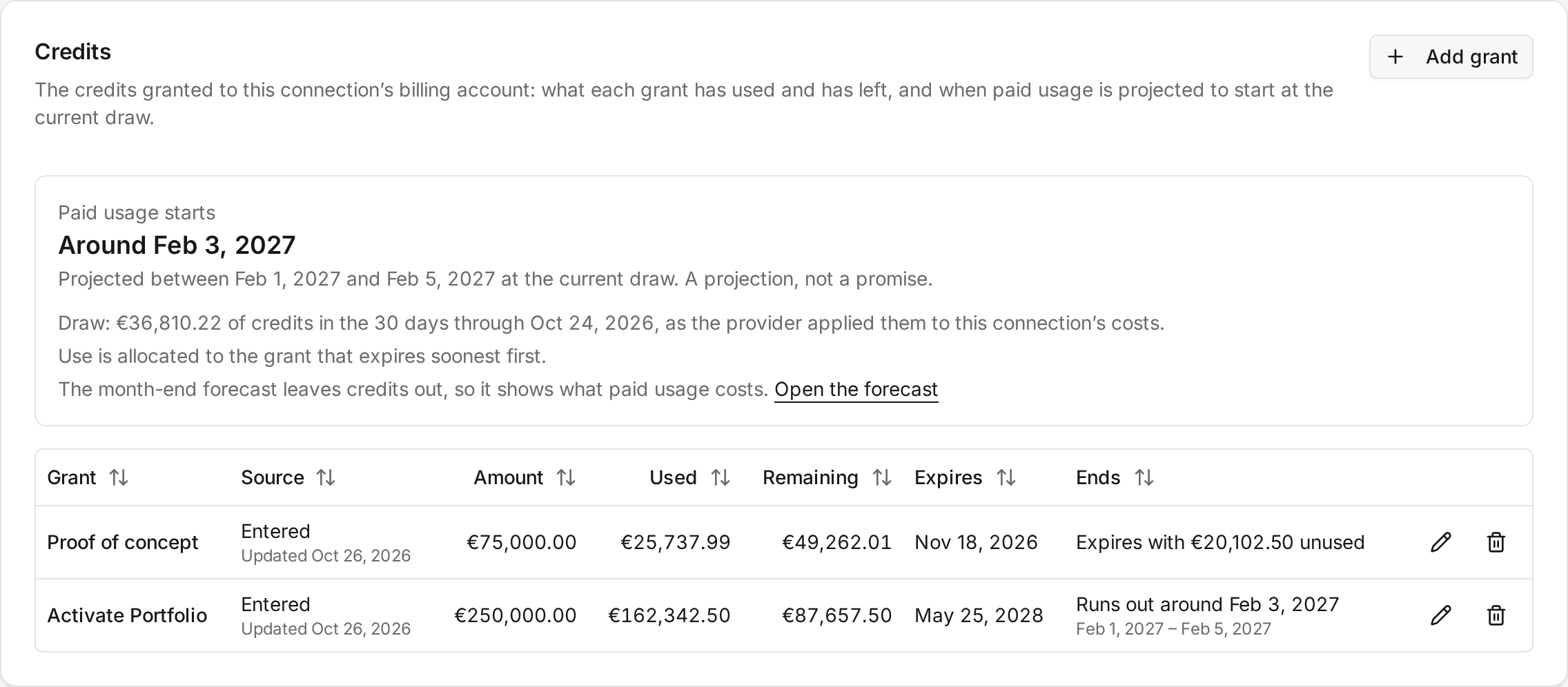
The top of the card shows Paid usage starts:
- "Around" a day: the day the last grant is projected to end. When the earliest and the latest day differ, the card adds "Projected between … and … at the current draw. A projection, not a promise."
- "Paid usage has already started, around …" once that day has passed.
- "Unavailable" with its reason when the runway cannot be counted; see How it behaves.
Below it the card names the draw it projects from: "Draw: … of credits in the 30 days through …" when it reads the credits the provider applied. When it reads spend instead, the line calls the draw "an estimate from this connection’s spend". The card also says that use is allocated to the grant that expires soonest first, and that the Month-end forecast on the Overview leaves credits out, so it shows what paid usage costs; "Open the forecast" opens the Overview.
Each grant has a row:
| Column | Shows |
|---|---|
| Grant | The name you entered, or the provider's description of a grant read from it; "Not counted" marks a grant left out of the runway; "Use before … unknown" marks an entered grant that started before the first day Costfluent can read the connection's costs, and "Expired before …: delete it" one that also expired before that day |
| Source | "Entered", with the day it was entered or last edited, or "From the provider", with the day it was last read |
| Amount | What was granted, in the grant's currency |
| Used | What it has covered through the last settled day; for a grant from the provider, its amount less what the provider states is left |
| Remaining | What it has left, never below zero; 0 once it has expired. For a grant from the provider, what the provider last stated |
| Expires | Its last day |
| Ends | "Runs out around" a day, with its earliest and latest day when they differ, when the projected draw uses it up before it expires; "Expires with … unused" when it expires with credit left, as projected or already past; "Ran out around" a day once it is used up; "—" without a projection |
How it behaves
-
The draw is each day's Credit rows of the connection, negated, since a provider bills a credit as a negative amount. A day whose Credit rows net positive, such as a credit reversed, draws nothing. The draw is the whole connection's, whichever workspaces read it, in the currency its costs are billed in.
-
A connection with no Credit row in the last 90 days draws on its spend instead, and the card calls the draw an estimate. That is the case for an Azure connection collecting subscriptions, which imports no credits (What is not imported), and for a grant whose first credits the provider has not billed yet. Where a grant does not cover every charge, the estimate overstates its draw.
-
The grant that expires soonest is used first. A day's draw goes to the grants that apply that day and still have credit, in that order, which is the order AWS documents. Google Cloud and Azure document none, so the card assumes the same order for them. A day before a grant starts or after it expires does not draw on it, and what a grant has left at its expiry is lost.
-
Figures run through the last settled day, normally two days ago, since a provider delivers the last day or two late, and earlier while the connection's data is behind.
-
The projection fits the model of the Month-end forecast to the last 84 settled days of the draw and carries it forward a day at a time to the last grant's expiry. A grant ends the day the projected draw uses up what it has left, or at its expiry with the rest unused. The earliest and the latest day come from the top and the bottom of the forecast's range. Paid usage starts the day the last grant runs out, or the day after it expires.
-
"Unavailable" shows in place of the day paid usage starts, with its reason, never a date or zero, when:
- the connection's costs arrive in more than one currency;
- a grant is in another currency than the connection's costs;
- fewer than 14 of the last 84 settled days carry a draw, too few to project;
- a grant you entered started before the first day Costfluent can read the connection's costs and still applies on that day.
In the first, second and fourth cases Used and Remaining read "—" too; in the third they still show.
-
A grant's use before the first day Costfluent can read is unknown, never zero. That day is the connection's first settled day with costs on or after the start of the earliest counted grant, or of the last 90 settled days when that is earlier. It is never before the first day of your plan's cost history, and it is that day when the connection has no costs from then on. The row of a grant you entered that started before it says "Use before … unknown" with that day. Use is allocated across every grant, so while such a grant still applies on that day, no grant shows Used, Remaining or Ends and no day paid usage starts is projected. Edit the grant to what your cloud's credits page says it has left today, with today as Starts on, and it counts again until that start falls outside your plan's cost history; on a plan with a short history, a long grant is entered again more than once. A grant that expired before that day says "Expired before …: delete it" and shows no figures, while the other grants keep theirs; delete it, since it cannot be entered again as of a later day. When it was the last grant to end, the day paid usage started is "Unavailable" too.
-
AWS grants are read from the account. Once a day Costfluent reads the credits AWS states for an AWS connection's account, with what is left of each by AWS's own estimate, and keeps them as grants "From the provider", which have no edit or delete button; a credit AWS has disabled is left out. While a grant from the provider was read in the last 7 days, the grants from the provider replace the entered ones, which the card marks "Not counted". The read needs
billing:GetCreditson the connection's role. Without it, or until a read answers, the entered grants count and the card says "Costfluent reads an AWS account’s credits once a day when the connection’s role allows “billing”; until a read answers, the grants entered here count." A connection is not read while every workspace it feeds has automatic syncing switched off. -
The notice. Once a day Costfluent checks every connection with a grant that has not expired. When paid usage is projected to start within 30 days, or a grant expires within 30 days with credit left, it sends one notice for that grant and kind; changing the grant's amount or expiry sends it again when it is due. Each notice goes:
- in the product to each workspace that reads the whole connection, and to none that reads only some of its accounts, since a grant is the billing account's;
- to every enabled notification channel of the organization, a webhook as the
credit_runwayevent (Webhook notifications); - by email to each Owner of the organization.
A grant that shows no figures gets no notice: while a grant whose earlier use is unknown still applies, the connection gets none.
The day paid usage starts is a projection from the recent draw, not a promise: a change in usage moves it. The provider's balance is what counts, so compare each grant with your cloud's credits page and correct it when they differ.
A Microsoft for Startups sponsorship subscription cannot be connected. Microsoft's Cost Management, which Costfluent reads, does not support the Azure Sponsorship offers (MS-AZR-0036P and MS-AZR-0136P) those credits come on (Understand Cost Management data), so Costfluent cannot read its cost or its credits.