Public API authentication
Create a Costfluent API token with only the capabilities it needs, send it with each request, and revoke it.
The Costfluent Public API accepts organization tokens beginning with cf_org_ and workspace tokens beginning with cf_ws_, each followed by 49 letters and digits, the last six a checksum that lets secret scanners recognise a real token. Settings creates either: an organization token by default, or a workspace token when Access names a workspace. A third kind, beginning with cf_k8s_ in the same format, is a cluster token: Costfluent shows it when a cluster is added under Kubernetes, and it reports that cluster's usage and nothing else (Connect Kubernetes). Tokens are credentials: keep them out of source control, logs, browser bundles and shared documents.
Before you start
Included in the Pro, Business and Custom plans. Compare plans
- Creating a token needs the Owner, Integration Owner or Editor organization role, and a token can never carry a capability its creator does not hold. The dialog shows only the capabilities you may grant for the Access you choose. An organization token reaches every workspace, so only an Owner can give it a workspace capability such as View costs; an Editor or Integration Owner chooses a workspace they can access under Access instead, or keeps Whole organization with organization capabilities only. A workspace token carries workspace capabilities only.
- A service token, which the organization owns rather than its creator, can be created only by an Owner who is a member of the organization.
- A token whose only capability is Report Kubernetes usage can be created on any plan; that is the token the Kubernetes agent needs. It too needs the Owner role, the only role that holds that capability.
Create a token
- Open Settings, then API tokens, and select Create API token.
- Enter a Name that says what uses the token, such as the pipeline or service.
- Under Access, keep Whole organization, or choose the one workspace the token needs; a workspace token reaches only that workspace.
- An Owner also chooses under Owned by: keep Me for a token of your own, or choose Organization for a service token, which keeps working when you leave. Choose Organization for automation the organization shares, such as Terraform or a CI pipeline.
- Under Start from, choose a preset, then adjust the Capabilities below it. Select only what the integration needs.
- Choose the Expiration: 30 days, 90 days or 1 year; 90 days is preselected. An Owner is also offered Never, with a warning, for a token such as the Kubernetes agent's that must not lapse.
- Select Create API token, then copy the token from Your API token. Its full value is shown only once.
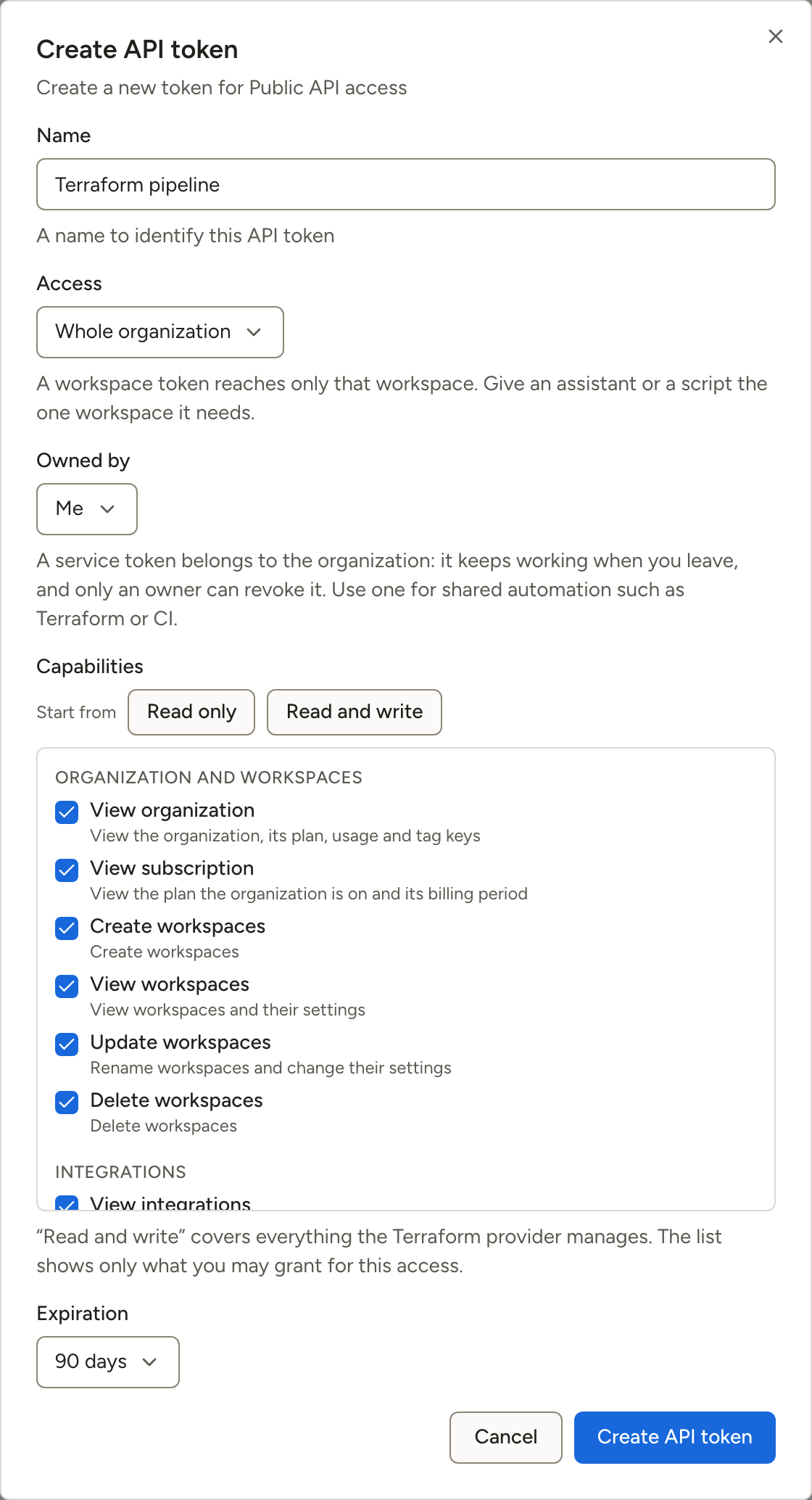
The presets are starting selections, each cut to what you may grant for the chosen Access; a preset with nothing to offer there is not shown:
| Preset | Selects |
|---|---|
| Read only | Every capability that views, outside the Users, teams and channels group: organization, subscription, workspaces, integrations, costs, anomalies, budgets, cost reports, report schedules, dashboards, cost allocation, tags and savings |
| Read and write | Every capability in the dialog except Report Kubernetes usage and the Users, teams and channels group, including Add integrations to workspaces and Remove integrations from workspaces; this is the preset for Terraform |
| Kubernetes agent | Report Kubernetes usage only, offered for Whole organization to an Owner |
The capabilities are grouped as Organization and workspaces, Integrations, Costs and anomalies, Budgets and cost alerts, Reports and dashboards, Allocation and tags, Savings, Users, teams and channels and Kubernetes. Each one names what it allows, such as View costs or Manage cost alerts. Manage savings on a token saves, changes and deletes views of the savings queue; the findings themselves are answered in the console. The API spells each capability by its camelCase id, such as viewCosts, which is what /v1/me returns in capabilities.
Manage tokens
API tokens lists each token with its Name, its Prefix, its Capabilities, who it was Created by, when it was Created and when it was Last used. A token whose creator was removed from the organization, suspended, or invited back and has not yet accepted is not revoked, and its row says Left the organization: an organization or workspace token stops working until its creator is an active member again, while the Kubernetes agent's cluster token and a service token keep working. A workspace token whose creator is still a member but no longer holds all of its capabilities in its workspace says Creator no longer has this access; it is refused what its creator no longer holds there, and works fully again if they regain it. Revoke it if it should stop for good, and create a service token for an integration that must keep running. Seeing the list needs the Owner, Integration owner or Editor organization role, and a member sees the workspace tokens of the workspaces they can view only.
To end a token at once, open the menu at the end of its row, select Revoke token, and confirm with Revoke. Any application using it loses access. An Owner revokes any token; an Editor or Integration Owner revokes the tokens they created, other than service tokens, and the menu appears only on those rows. A revoked token stays in the list, marked Revoked.
Service tokens
A service token belongs to the organization rather than to the person who created it. Its row says Service token beside who it was Created by, and it keeps working when that person leaves the organization, is suspended, is no longer an Owner, or has their account disabled or deleted: only the capabilities it was issued, its Access and the organization's plan bound it. A write it makes is recorded in the audit log with the token's name as the actor, as any token's is.
- Only an Owner who is a member of the organization creates one; a partner's staff working in a managed organization cannot, because the token would outlive the partnership. Only an Owner revokes one, whoever created it, so a creator who is no longer an Owner cannot end it.
- It carries no more than its creator could grant when it was created: an organization service token any capability in the dialog, a workspace service token the workspace capabilities only.
- Its row keeps naming its creator, and says Left the organization once they leave. They saw its value when it was created, so when they leave, create a new service token, move the integration to it, and revoke the old one.
Send a request
Pass the token with the standard Bearer authorization scheme:
Code
Use your tokens only with https://api.costfluent.com.
Use the playground safely
The API reference includes an interactive playground. Select the correct server, authorize with a scoped token, and review the request before sending it. Write and delete operations affect live workspace data on the selected server.
Workspace tokens
A workspace token acts in its own workspace the way an organization token acts in every workspace, and nowhere else:
| The request | A workspace token gets |
|---|---|
| Reads or changes its workspace, or an object in it | The same answer as an organization token |
| Names another workspace, or an object in one | 403, and nothing changes |
| Lists without naming a workspace: workspaces, budgets, integrations, anomalies | Its workspace's entries only |
Reads costs without naming a workspace (/v1/costs, /v1/costs/summary) | The costs of the integrations linked to its workspace |
| Is organization-level, which the API reference says under the operation, such as linking an integration to a workspace or changing which of its accounts the workspace reads | 403; use an organization token |
Reads reference data: currencies and exchange rates, available integrations, filter translation, /v1/me, /v1/ping | The same answer as an organization token |
How it behaves
- A request is refused when the token lacks the capability the operation needs, whatever the role of the person who created it. The API reference names that capability under each operation, such as "Needs an organization token with
inviteUser", and the403names it inerrors[0]with the codemissing_capability. - A token expires at most a year after it is created. A request to the Backend API that names no expiry gets 90 days; one naming a date more than a year away is refused with
400, and one asking forneverExpiresis refused with403unless an Owner sends it. - A token stops working, answering
401, once the account that created it is disabled or deleted. An organization or workspace token also answers401while its creator is not an active member of the organization, and works again if they are reactivated; the Kubernetes agent's cluster token keeps working, as Manage tokens describes. A service token is stopped by neither: only revoking it, its expiry, or the deletion of its workspace ends it. - Creating an organization or workspace token needs a recent sign-in: a sign-in, or a confirmation that it is you, from the last 60 minutes. From an older session the request answers
403withreauthentication_required, and the console asks you to confirm it is you, then creates the token; refreshing the session does not count. - A
401carriesWWW-Authenticate: Bearer realm="costfluent", error="invalid_token"when a token was sent, and the realm alone when none was. - When the organization's plan does not include API tokens, every request with one of its tokens answers
403withplan_upgrade_required, anderrors[0]names the plan that includes them. The tokens work again after an upgrade. An organization token that carries only Report Kubernetes usage keeps working on every plan. A revoked or expired token, or a workspace token whose workspace was deleted, answers401first. - The dialog offers only what you may grant for the chosen Access, and choosing another keeps only the capabilities it also offers. A request to the Backend API that asks for more is refused with
403naming the capabilities. A workspace token request keeps only its workspace capabilities; one asking for none is refused. - An organization token created by an Editor or Integration Owner before only Owners could give one workspace capabilities reaches only the workspaces its creator can access, with no more than they hold there; any other workspace answers
403. Its organization capabilities keep working. A token an Owner created reaches every workspace while they remain an Owner, and an organization capability only an Owner holds, such as Update workspaces, Delete workspaces or Manage teams, works only while its creator still holds it, and/v1/meleaves it out ofcapabilitiesmeanwhile, as it leaves out a workspace capability its creator holds in no workspace. Report Kubernetes usage is the exception: the agent keeps reporting until the token is revoked. A403refused this way says indetailthat the token's creator does not hold the capability and names none inerrors, because a new token with the same creator would be refused the same way. - A workspace token holds no more in its workspace than its creator holds there now. Once they lose access to the workspace, or hold less in it, such as Can view instead of Can edit, the token is refused what they no longer hold with the same
403, a list that names no workspace leaves the workspace out once they cannot view it, and/v1/meleaves those capabilities out ofcapabilities. It works fully again if they regain access. A workspace token an Owner created keeps all of its capabilities while they remain an Owner. - A service token is held to neither of the two rules above: it keeps every capability it was issued, in every workspace its Access reaches, whatever its creator holds now.
- Naming
workspaceIdon/v1/costsor/v1/costs/summarylimits the figures to the integrations linked to that workspace, for an organization token as well. - An object in another organization answers
404to every token. /v1/menamesdefaultWorkspaceId, the workspace to act in when none is named: a workspace token's own; for an organization token, the default workspace of the person who created it while they are an active member who can view it, else the oldest workspace the token reaches. A service token always answers the oldest workspace it reaches, so its default does not move when its creator leaves or chooses another.