# Carbon footprint
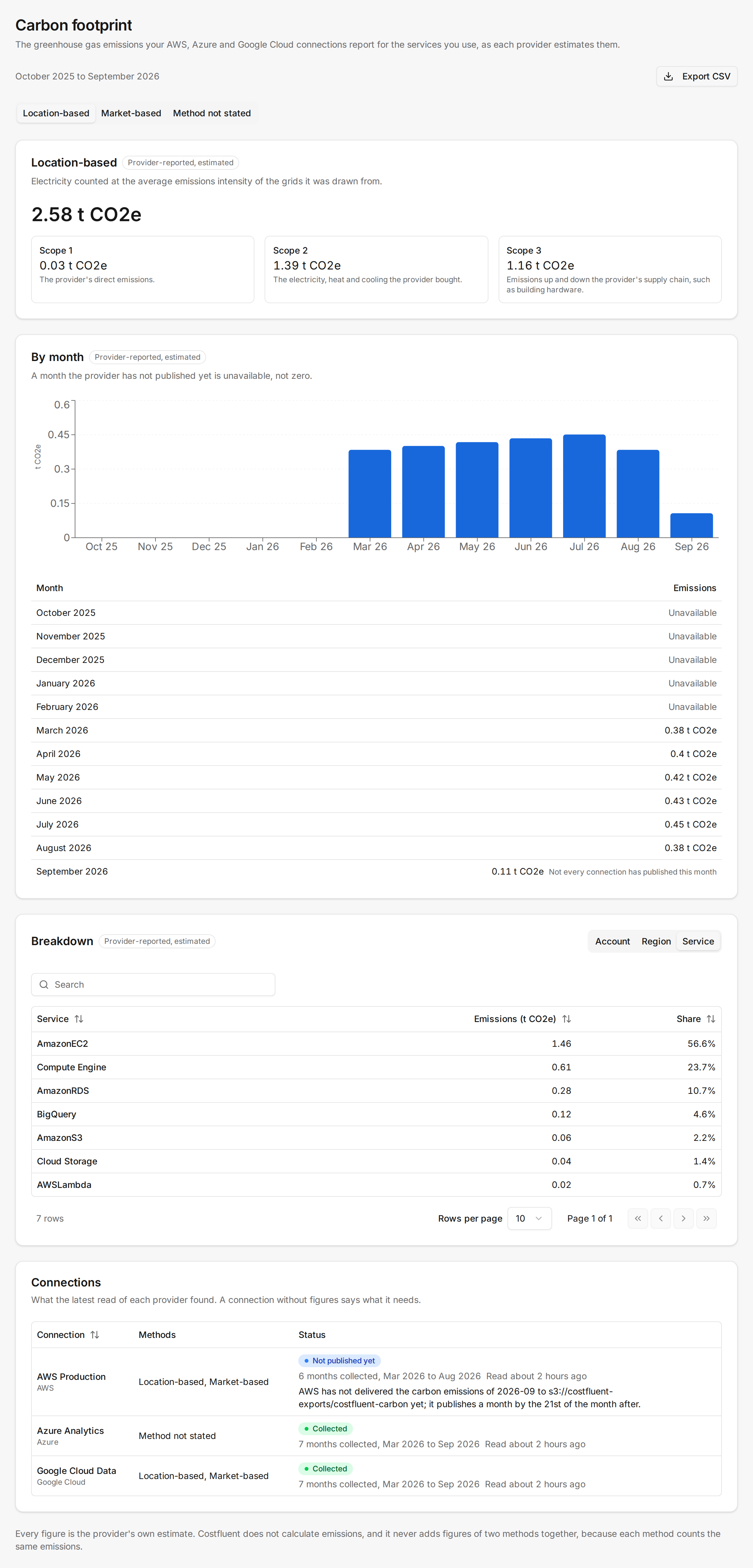
**Carbon footprint** sits under **Reporting** in the product's sidebar. It shows the emissions each
cloud provider itself reports for the workspace's AWS, Azure and Google Cloud connections, over the
last twelve closed months: a total and its scopes, every month, and a breakdown by account, region
or service. Every figure is the provider's own estimate under the provider's own methodology.
Costfluent calculates no emissions, and it reads none for other providers, Kubernetes or AI APIs.
## Before you start
- Any team role can view the page and export it. It is available on every plan; your plan's cost
history limit applies to it as to every cost report.
- Each connection needs one extra step before its provider shares emissions with Costfluent; see
[What each provider needs](#what-each-provider-needs). The cost data a connection already reads
carries no emissions.
- Figures arrive once a month, on the 22nd. A connection set up today shows its figures after the
next 22nd.
## Read the report
1. Open **Carbon footprint** under **Reporting**. The line above the figures names the months the
report covers.
2. Choose a method in the tabs: **Location-based** and **Market-based** for AWS and Google Cloud,
**Method not stated** for Azure. Each tab shows only that method's figures.
3. Read the method's total and its **Scope 1**, **Scope 2** and **Scope 3** split, then **By month**.
4. Under **Breakdown**, choose **Account**, **Region** or **Service** in **Break down by**, and
search the rows.
5. Under **Connections**, read what the latest read of each connection found.
A method's figures read in one unit: kg CO2e while its total is under 1,000 kg, t CO2e from there. A row the provider left without
an account, region or service reads "Not named by the provider".
## Methods and scopes
A method is the way a provider counts the electricity behind your usage:
- **Location-based** counts electricity at the average emissions intensity of the grids it was
drawn from.
- **Market-based** counts electricity at the intensity of what the provider bought, renewable energy
contracts included.
- **Method not stated** is Azure's: Microsoft names no method for these figures, so they stand on
their own.
Both methods count the same emissions, each in its own way, so Costfluent never adds two methods
together. A workspace with AWS and Azure connections shows an AWS figure under each of the first two
tabs and the Azure figure only under the third; no tab holds a grand total across methods.
The scopes are the provider's, as it reports them:
- **Scope 1** is the provider's direct emissions, such as fuel burned in its data centers.
- **Scope 2** is the electricity, heat and cooling the provider bought. This is the scope the method
changes.
- **Scope 3** is emissions up and down the provider's supply chain, such as building the hardware.
Each method's total holds all three scopes. Scope 1 is the same figure under both methods, and for
Google Cloud so is scope 3. AWS states scope 3 per method.
## What "Provider-reported, estimated" means
Every total carries **Provider-reported, estimated**. The provider estimates your share of its
emissions from your usage, with its own model, and publishes the result; Costfluent reads it and
converts its unit to kilograms of CO2 equivalent, nothing more. A provider can restate a month or
publish under a new model version, so the same month can change between two reads. The CSV names the
model version of every figure.
Each provider documents how it estimates:
- AWS: [Carbon emissions calculation methodology](https://docs.aws.amazon.com/sustainability/latest/userguide/methodology-carbon.html)
- Microsoft: [Azure emissions calculation methodology](https://learn.microsoft.com/en-us/power-bi/connect-data/azure-emissions-calculation-methodology)
- Google Cloud: [Carbon Footprint reporting methodology](https://docs.cloud.google.com/carbon-footprint/docs/methodology)
:::caution
This is not a compliance report. Costfluent does not calculate, verify, audit or certify the figures,
and the report claims no reporting standard. Before you use a figure in a disclosure, read the
provider's methodology for what it covers and leaves out.
:::
## Export the figures as CSV
1. Open **Carbon footprint**.
2. Select **Export CSV**. The file holds every figure of the months the report shows, for every
connection and method, whichever tab is open.
One row per figure the provider reported, in these columns:
| Column | Holds |
|---|---|
| `month` | The month, as `2026-09` |
| `provider` | `aws`, `azure` or `gcp` |
| `connection` | The connection's ID |
| `account` | The AWS account, Azure subscription or Google Cloud project |
| `region` | The region the provider names |
| `service` | The service the provider names; for Azure, the resource type |
| `scope` | `scope 1`, `scope 2` or `scope 3` |
| `method` | `location-based`, `market-based` or `not stated` |
| `kg_co2e` | The figure in kilograms of CO2 equivalent |
| `model_version` | The provider's model version; empty for Azure, which states none |
| `basis` | Always `provider-reported estimate` |
Adding up the rows of one method gives that method's total; adding rows across methods counts the
same emissions twice. Each export is recorded in the audit log.
## What each provider needs
| Provider | What to set up | Where |
|---|---|---|
| AWS | A second Data Export, of the `CARBON_EMISSIONS` table, into the same bucket and prefix as the cost export. The CloudFormation stack and the Terraform module create it; the role needs no new permission. | [Connect AWS](/connect/aws#carbon-emissions-export) |
| Azure | The built-in role Carbon Optimization Reader for the service principal on each subscription, beside Cost Management Reader. | [Connect Azure](/connect/azure#carbon-emissions) |
| Google Cloud | The Carbon Footprint export to BigQuery, into a dataset in the billing export's project, BigQuery Data Viewer on it for Costfluent's service account, and that dataset on the connection. | [Connect GCP](/connect/gcp#carbon-footprint-export) |
## How it behaves
- **Cadence.** Costfluent reads every AWS, Azure and Google Cloud connection on the 22nd of each
month, after all three have published the previous month: Google Cloud on the 15th, Azure by the
19th, AWS by the 21st. Each read takes the last three closed months again, because providers
restate recent months. A connection that is in error or disabled on the 22nd is read on the next
22nd after it recovers, over the months it missed.
- **First read.** A connection's first read reaches back as far as the provider and your plan's
history allow: to January 2022 for AWS, twelve months for Azure, and January 2021 for Google
Cloud. The report shows the last twelve closed months of it.
- **Plan history.** When your plan's history starts inside the twelve months, the report starts
there and says so: "Your plan's history starts in …, so this range starts there."
- **Missing months.** A month no connection of a method has published yet reads **Unavailable**,
never zero. A month only some connections have published is marked "Not every connection has
published this month", and its total holds only theirs.
- **Connection status.** Under **Connections**, each connection shows **Collected**, **Not
published yet**, **Not set up**, **Access refused** or **Not read yet**, the months collected and
when it was last read. A connection without figures carries the provider's sentence naming what
is missing, such as the permission to grant and to whom.
- **Azure subscriptions.** One subscription without Carbon Optimization Reader refuses the whole
month for its connection, because a month without it would read as complete. The sentence names
the subscriptions.
- **No connection.** A workspace without an AWS, Azure or Google Cloud connection shows "No
connection reports emissions" and a way to connect one.
## Related
- [Connect AWS](/connect/aws)
- [Connect Azure](/connect/azure)
- [Connect GCP](/connect/gcp)
- [Plans and billing](/plans-and-billing)